A Systems View of AI-Assisted Programming
Translated from the Spanish original with AI assistance. The original was written entirely by hand, no AI involved.
In the first article of this series we concluded that hallucinations are the fundamental feature of the LLMs on which Programming Assistants like Claude Code, Cursor, Gemini CLI, Windsurf, etc. are built, and that these hallucinations can be positive or negative depending on whether they add value to our code or not.
On the other hand, in the second article of this series, The Mathematics of AI-Assisted Code, we concluded that negative hallucinations are inevitable, and that there is a non-trivial cost in detecting and rejecting them so that the ROI of using these tools is justified by maximizing the positive hallucinations.
Now we are going to explore these assistants, and the fundamental loop in which we use them, through this diagram that defines several sub-systems and flows in an extremely simplified way so we can focus on what is fundamental:
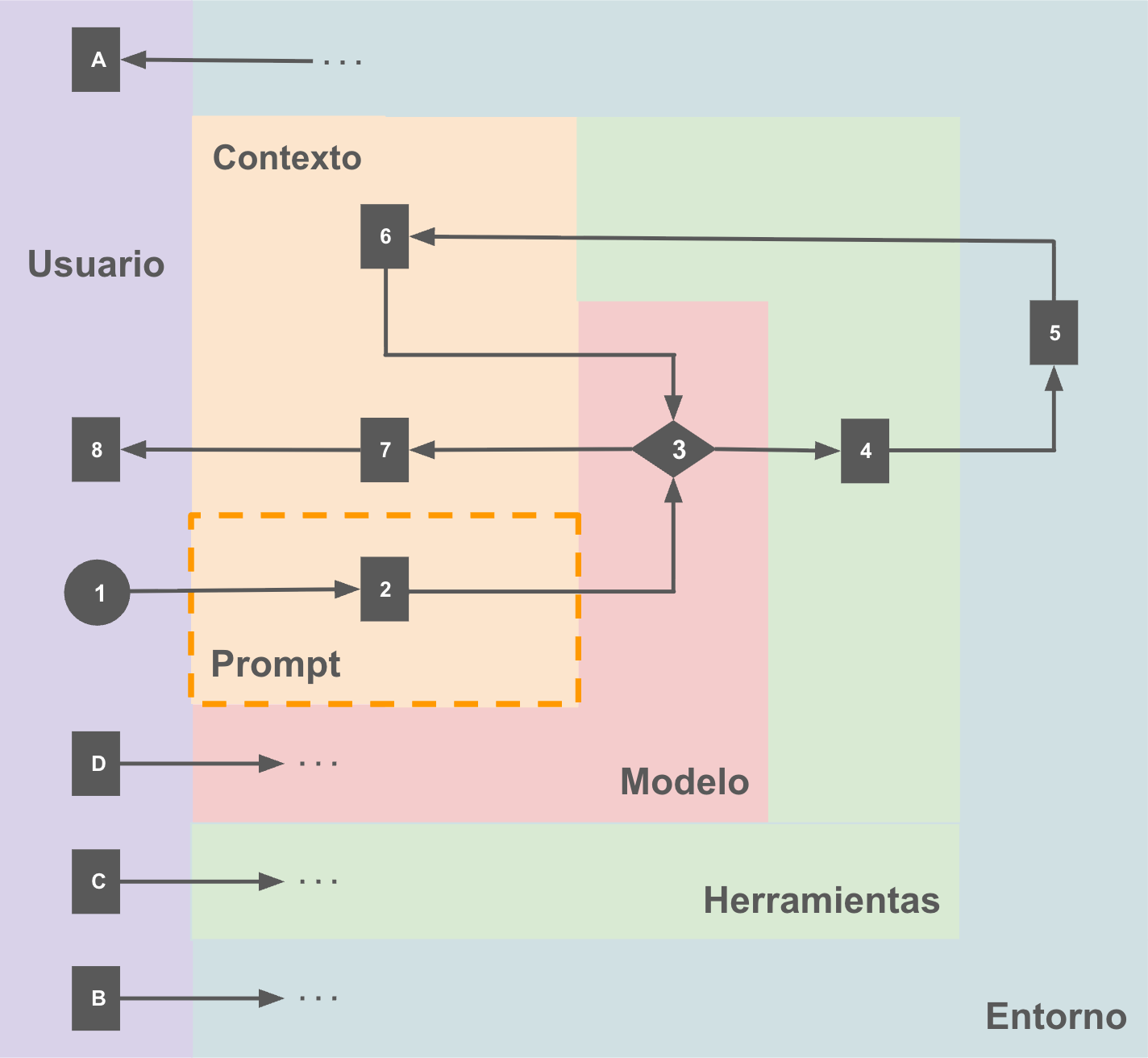
Let’s review the sub-systems first:
- Environment: One way or another this involves a file system, local or in a virtualized environment, normally with a clone of a repository, the internet, and any other service that could be useful to the model. It is important to distinguish that there are two big categories of information here:
- The one intrinsic to the problem being solved, the code of interest we operate on through the assistant.
- The one that is support for the assistant, like the
AGENTS.mdorCLAUDE.mdfiles
- User: Generally a human, but there are multiple mechanisms for one Programming Assistant to “use” another, whether via SDK or command line.
- Model: In general, an LLM optimized to be able to use this system around it. Right now, and depending on preferences, we are talking about a Sonnet 4.5 (Anthropic), GPT-4o (OpenAI), Gemini 2.5 Pro, Kimi K2 (Moonshot), GLM-4.5 (Z.ai), etc… or a combination of several models at different moments, or even a sub-system of agents.
- Tools: Typically divided into two big groups:
- The assistant’s own, like access to the file system, the ability to search the internet, or the ability to run commands in a terminal
- MCPs (Model Context Protocol), which offer structured access to third-party services through a standard interface. Two very well-known examples are Context 7 (docs) and Playwright (driving a local browser).
- Context: For practical purposes, a log of all the texts written by the user, generated by the model, and by the tools it may have invoked. It is important to keep in mind that:
- The context does not start out empty; at minimum it includes a system prompt, the instructions in files like
AGENTS.mdorCLAUDE.md, descriptions of the available tools, and in the specific case of Claude Code:SKILLs, which are a form of documentation based on the principle of progressive disclosure to “look after” the context. - The length of the context grows with every user interaction, with the response of every tool invoked by the model, and with every response the model generates.
- The context is limited, and its size has a direct impact on the model’s capacity to pay attention to what matters and give answers that add value for us, that is, positive hallucinations.
- The context does not start out empty; at minimum it includes a system prompt, the instructions in files like
Regarding the environment, since I start from the idea that nothing is obvious, it must be pointed out that:
- A: As users we can directly inspect the environment the assistant operates in: we can read files, list directories, check the state of our copy of a sandbox, search the internet.
- B: Additionally, as users we can directly modify that same environment: create and modify files, make a commit, download a file from the internet, install a tool.
Here is where our role as users of the system starts getting interesting, because:
- C: It is very common that we can select which model we want to run, or under what conditions — for example, in the case of Claude Code, activating “reasoning mode”, even specifying the famous “ultrathink” option with the corresponding token consumption.
- D: We affect the tools available to the model, and that goes from which applications we install in the terminal, to which MCPs will be configured, to which intrinsic tools we grant the model access (permissions).
Now that we have the basics covered, a “typical” flow through this system could be described by the following steps, which are numbered in the diagram:
- As a user, I write a prompt.
- In practical terms, that prompt is appended to the already existing context.
- Control is handed to the model, which will operate with the available context. Typically it may decide it needs information from the environment to continue with the associated task, and this implies using one or more tools.
- Using a tool is not much more than “writing” a function call that maps to one of the available ones.
- The tool executes; it may have some side effect on the environment, or just return information from it
- Executing a tool will always imply updating the context, both with whatever information may have been requested and with the execution status.
- Finally, at some point, the model will decide that it finished the task, or that it needs more information from the user, and will update the context with a response.
- The user reads the model’s response, the last entry in the context.
And the cycle starts again at 1.
Again, this is a simplified model. The key points we have to take away from this article are:
- The assistant operates in an environment, which it only knows through the use of tools
- The environment comprises information that is:
- Intrinsic to the problem being solved, aka “our code”
- Specific to the assistant, to make its job easier
- The user is part of the system
- They have access to the entire environment
- They decide the tools available to the model
- They even decide which model to run, and how
- The model only knows the context, to which the following get appended:
- The system prompt
- The instructions for the assistant (
AGENTS.md,CLAUDE.md, etc.) - The user’s requests, prompts
- The results of the tool calls
- The model’s responses to the user
With this systems view we can clearly see a new factor that amplifies the role of hallucinations in Programming Assistants: the context is not only limited, it is a fragmentary representation of the environment built from tool calls — in particular, of the code that is our fundamental object of interest.
Every tool invocation adds information to the context, or modifies the environment, eventually reporting back to the context, and this will have an impact on the quality of the hallucinations the model generates downstream in the inference process.
It is not enough to think only about the quality of our prompts, these are just a small part of the context. Our approach to these systems has to be intentional, and it is indispensable to align the different sub-systems and the processes that connect them to favor positive hallucinations over negative ones.
In the next installments of the series we will define two key processes with which we can exercise that control systematically to maximize value generation: steering, how to guide the model toward positive hallucinations, and backpressure, how to detect and reject the negative ones efficiently.